Anyone who has used an AI agent for real work knows the drill. It wants to read a folder — approve. It wants to reach a website — approve. It wants to run a command — approve. By the tenth prompt, the "Always Allow" button looks very attractive.
Don't click it.
The approval prompt is the one moment where you, the human, see what the agent is about to do before it does it. That's true whether you run a ten-person business or you're protecting your own household's accounts. Approving access one request at a time is slower. Recovering after a hijacked agent has already acted on your behalf is much slower — and we'll do the honest math on that below.
The target has moved
For twenty years, attackers went after the person: phish the password, then trick the user into approving an MFA prompt, steal the session after login, or hijack the phone number the codes go to. MFA itself rarely breaks — attackers go around it. That still works. But an AI agent with access to your files, your inbox and your browser is a better target. It doesn't get suspicious, it doesn't take lunch, and it follows instructions — including instructions it was never supposed to receive.
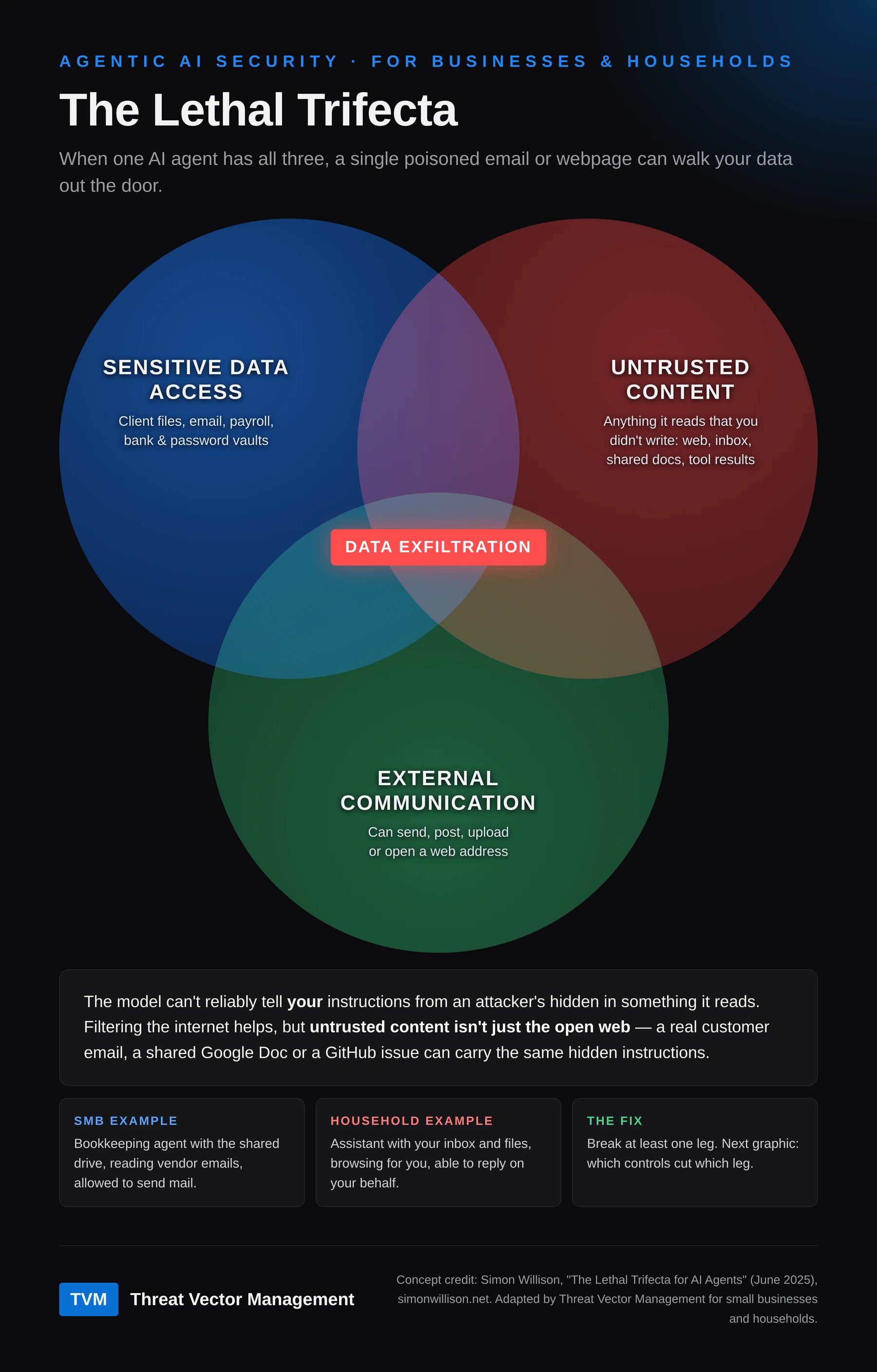
Security researcher Simon Willison named the core problem the lethal trifecta. An agent that has all three of these can be tricked into handing your data to an attacker:
- Sensitive data access — client files, email, payroll, bank and password vaults.
- Untrusted content — anything the agent reads that you didn't write yourself.
- External communication — the ability to send, post, upload or open a web address.
The catch is in number two. It's tempting to read "untrusted content" as "the open internet," and DNS filtering and web filtering do help. But a real customer's email, a shared Google Doc, a calendar invite or a GitHub issue are all untrusted content too — and all of them have been used to carry hidden instructions. The model can't reliably tell your instructions apart from an attacker's hidden in something it reads. In Willison's words: "we still don't know how to 100% reliably prevent this from happening."
What that looks like in practice:
- Small business: a bookkeeping agent with access to the shared drive, reading vendor emails, allowed to send mail.
- Household: an assistant with your inbox and files, browsing for you, able to reply on your behalf.
Both have all three legs. Both are one poisoned message away from a leak.
Framework mapping: OWASP Top 10 for Agentic Applications — ASI01 Agent Goal Hijack, ASI02 Tool Misuse.
This is not theoretical
Every one of these happened:
- May 2025 — GitHub MCP server. Invariant Labs showed a malicious issue in a public repository could hijack a developer's agent into pulling data from their private repositories and publishing it. Their note on the root cause: many users "already opt for an 'Always Allow' confirmation policy when using agents, and stop monitoring individual actions."
- June 2025 — Microsoft 365 Copilot "EchoLeak" (CVE-2025-32711). Aim Security showed a single crafted email could lead Copilot to exfiltrate internal data with no click from the user. Microsoft fixed it server-side.
- August 2025 — Nx "s1ngularity" supply-chain attack. Malicious versions of a popular build package ran the victim's own AI coding tools — Claude Code, Gemini CLI and Amazon Q — with their permission checks turned off (
--dangerously-skip-permissions,--yolo,--trust-all-tools) and told them to search the machine for SSH keys, crypto wallets and.envfiles. The agent became the insider. - September 2025 — fake
postmark-mcpserver. Koi Security found what they called the first malicious MCP server in the wild. One added line of code BCC'd every email the agent sent to the attacker. - January–February 2026 — OpenClaw. A viral personal agent that asks for broad access to the operating system. Kaspersky reported more than 230 malicious "skills" pushing password stealers in under a week, and nearly 1,000 installs exposed to the internet with no authentication. Oasis Security's "ClawJacked" research showed any website you visited could take over the agent running on your machine; it was patched within 24 hours of disclosure.
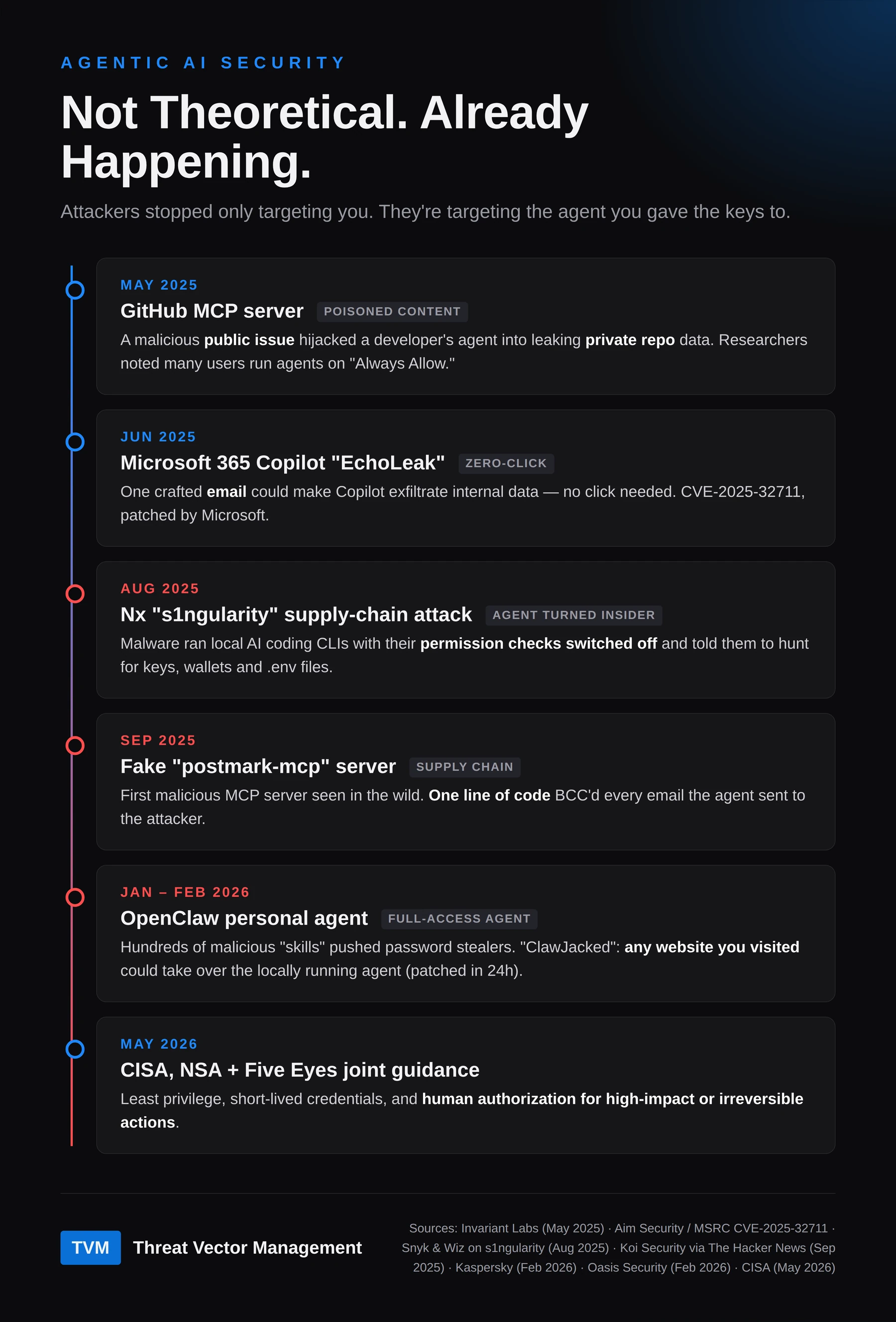
Nobody broke the AI model in any of these. They poisoned what it read, or what it installed, and let the access the user had already granted do the rest.
Framework mapping: OWASP ASI04 Agentic Supply Chain Vulnerabilities, ASI03 Identity & Privilege Abuse; NIST SP 800-53 SI-7 (software integrity) and SR-3 (supply chain controls).
Standing access is the real risk
A person with admin rights goes home at night. An agent with standing access to your drive, your email and your browser profile is always on, and always reachable by whatever content it touches next.
In May 2026, CISA, the NSA and their Five Eyes partners published joint guidance, Careful Adoption of Agentic AI Services. The core recommendations will look familiar to anyone who has run an identity program: least-privilege access so agents have only the permissions their task needs, short-lived credentials, and human authorization — not the agent's own judgment — for high-impact or irreversible actions.
IBM's 2025 Cost of a Data Breach report shows how far behind most organizations are: of those that reported a breach of their AI models or applications, 97% lacked proper AI access controls.
Now what? Break the trifecta
You don't need every control on the market. You need at least one leg of the triangle cut, and ideally all three narrowed. Here's where the common controls actually sit:
① Sensitive data — shrink what it can reach - Give the agent its own work folder and nothing else. Never your Downloads or Documents folder — that's where bank statements, tax returns and signed contracts land. - Run the agent as your everyday standard user, never as an administrator. - Application control (an allow-list of approved apps) so a hijacked agent can't launch whatever it downloads. - Endpoint protection / EDR to flag credential and cookie theft — the exact behavior in the s1ngularity attack.
② Untrusted content — filter what it reads - DNS filtering to block known-bad domains. - IPS on the way in to stop exploits and malware. - An AI gateway that inspects prompts and tool results on the way in. - Only vetted, version-pinned plugins, skills and MCP servers.
③ External communication — control what leaves - DLP on the way out to catch sensitive data leaving. - An egress allow-list, so the agent can only reach the sites the job needs. - The AI gateway inspecting output as well as input.
In the middle — a human OKs anything that sends, pays or deletes, runs a script, or asks for a new folder or website.
Two of those deserve a closer look, because they're the prompts people approve without thinking:
- "Can I run this script?" If you can't read it yourself, get a second opinion before you say yes. Remove any passwords, keys or internal server names, then paste it into a separate, private AI chat — Duck.ai is one option that doesn't tie chats to an account — and ask, "What does this do? Is anything in it risky?" It's a second opinion, not proof: the same hidden-instruction trick can fool that AI too. If it touches files outside the work folder, downloads something, or sends data anywhere, say no.
- "Can I access this folder?" Make sure it's the AI's own work folder. If it's asking for Downloads, Documents, Desktop or your whole home folder, the answer is no.
Underneath all three — the foundation: - Two accounts on every laptop. Your daily account is a standard user. A separate admin account is used only to install software. If you have one login and it's an admin, anything that hijacks you — or your agent — gets the whole machine. - MFA on a separate device (more on this below). - Never "remember this device" on banking, email or anything that matters. - No "Always Allow" and no skip-permission modes on a machine that holds real data.
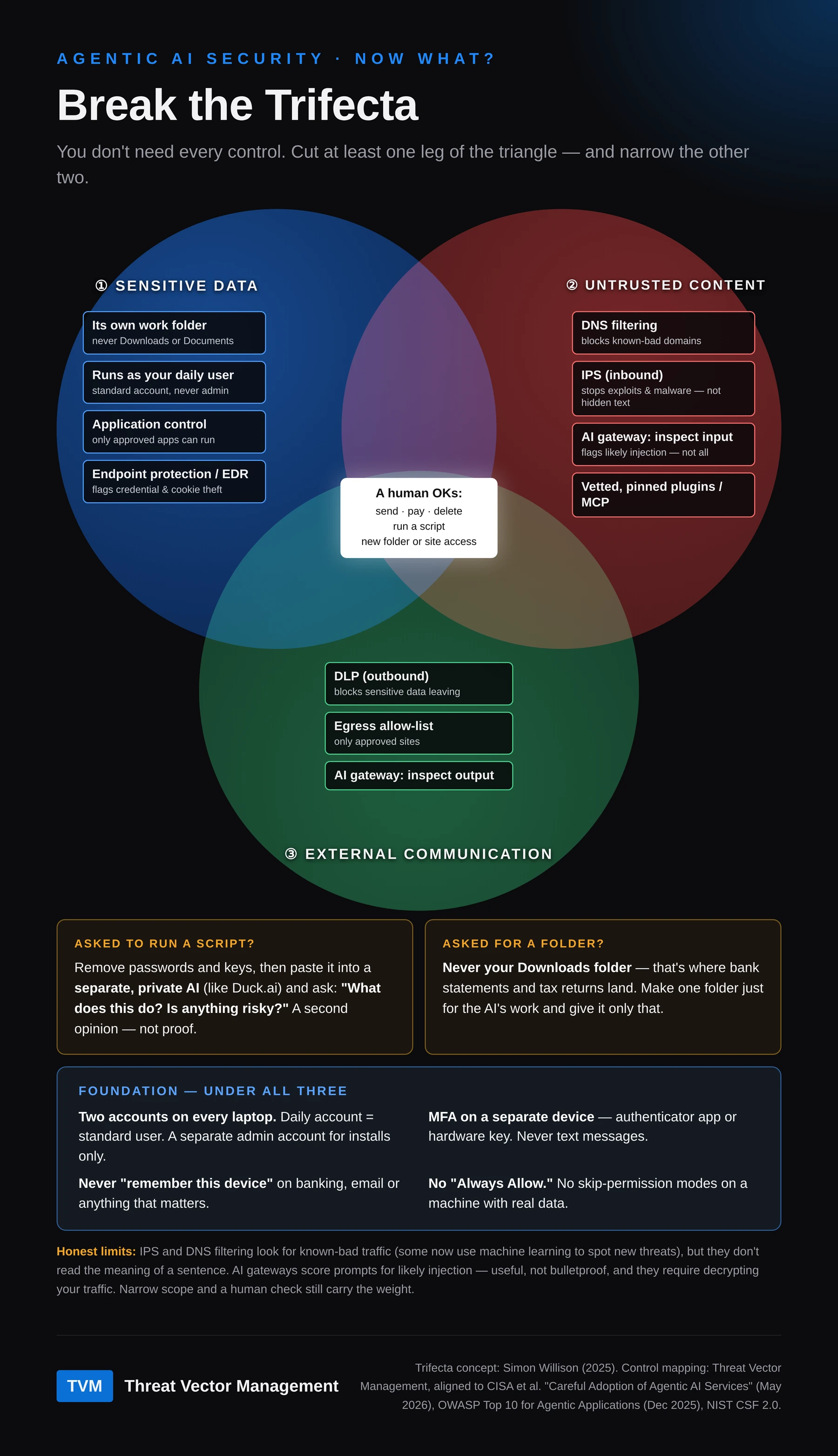
To be straight about the limits: IPS and DNS filtering look for known-bad traffic and domains. Some now use machine learning to spot never-before-seen exploits, but they're still reading network traffic, not the meaning of a sentence — so they won't catch an instruction hidden in a perfectly normal-looking page or email.
Is an AI gateway the better answer? It's the most direct control for this problem, and worth looking into — with eyes open. There are two kinds:
- For the AI your team uses (a secure web gateway or SASE service with AI controls): it can block unapproved AI tools, apply DLP to what people paste into prompts, and log AI use. To see inside that traffic it has to decrypt it, which means installing the gateway's root certificate on every device (trivial with device management) and rotating that certificate on a schedule (which can be automated). Apps that pin their certificates will break unless you exempt them — and exempted traffic isn't inspected.
- For AI apps you build (an API gateway or "firewall for AI" in front of your model): it scores prompts for likely injection and can block or flag them. No certificates on laptops, but it only protects that app.
The trade-offs: detection is probabilistic, so it catches likely injection, not all of it. And a decrypting gateway sees everything that passes through it, so choose the vendor as carefully as you'd choose your email provider, and exclude banking and health traffic from inspection. For a small business already on a SASE platform, turning on its AI controls is a fast win. For a household, it's usually overkill — scope, separate accounts and the human check come first.
Framework mapping: CISA et al., Careful Adoption of Agentic AI Services (May 2026); NIST CSF 2.0 PR.AA-05 (least privilege and separation of duties); NIST SP 800-53 AC-6 (least privilege), AC-6(2) (non-privileged accounts for daily use), CM-7(5) (allow-listing), SC-7 (boundary protection). An agent with standing, broad access falls short of the intent of all of them.
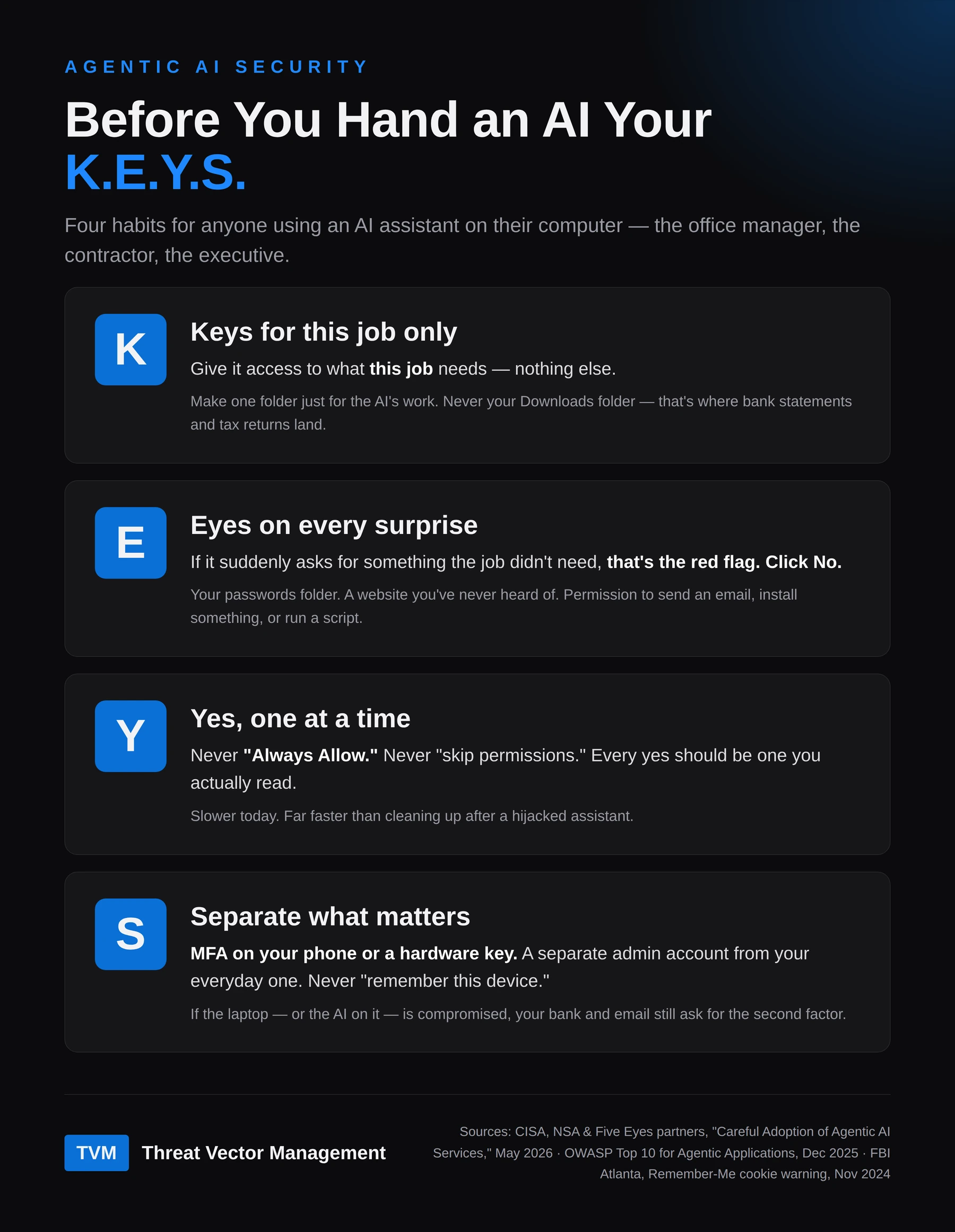
The short version: K.E.Y.S.
Not everyone reading this runs a security stack. For the office manager, the contractor with one laptop, or the executive who just wants the assistant to handle email, it comes down to four habits before you hand an AI your K.E.Y.S.:
- K — Keys for this job only. Give it access to what this job needs, nothing else. Make one folder just for the AI's work — never your Downloads folder, which is where bank statements and tax returns land. Not your whole computer, your email and your bank.
- E — Eyes on every surprise. You won't always know when a prompt is coming, and that's the point. If it suddenly asks for something the job didn't need — your passwords folder, a website you've never heard of, permission to send an email, install something or run a script — that's the red flag. Click No.
- Y — Yes, one at a time. Never "Always Allow." Never "skip permissions." Every yes should be one you actually read.
- S — Separate what matters. MFA on your phone or a hardware key. A separate admin account from your everyday one. Never "remember this device."
The honest math: prompts aren't free
It would be easy to say "each prompt only takes a few seconds" and stop there. That undersells the cost, so let's add it up.
Assume 10 seconds to read and answer a prompt, and 250 workdays a year. (Both are our estimates; nobody has published a good measurement.)
| How you work | Per year | 3 years | 10 years |
|---|---|---|---|
| Light use · 20 prompts/day | 14 hrs | 42 hrs | 139 hrs |
| Heavy, unscoped · 100 prompts/day | 69 hrs | 208 hrs | 694 hrs |
| Heavy, scoped and sandboxed · −84% | 11 hrs | 33 hrs | 111 hrs |
So how long until something goes wrong? There's no clean actuarial number for AI agents yet, but there are good numbers for businesses in general:
- 59% of small businesses reported a cyber-attack in the last 12 months (Hiscox Cyber Readiness Report 2025, ~6,000 firms). Most "attacks" aren't breaches, but it shows how often someone is knocking.
- Cyentia Institute's IRIS 2025 puts the yearly chance of a major cyber incident across organizations at 9.3%. That's roughly one every 11 years — or about 62% odds of at least one over 10 years, if the 2024 rate holds.
Now take the worst case for our own argument: 100 prompts a day, every workday, for ten years. That's about 694 hours — roughly $69,000 of your time at $100 an hour. Put that next to one incident: the median ransomware payment alone was $115,000 in Verizon's 2025 DBIR, before downtime, cleanup, fines or lost clients. Hiscox found a third of attacked small businesses were hit with a substantial fine. IBM's average breach took 241 days to identify and contain.
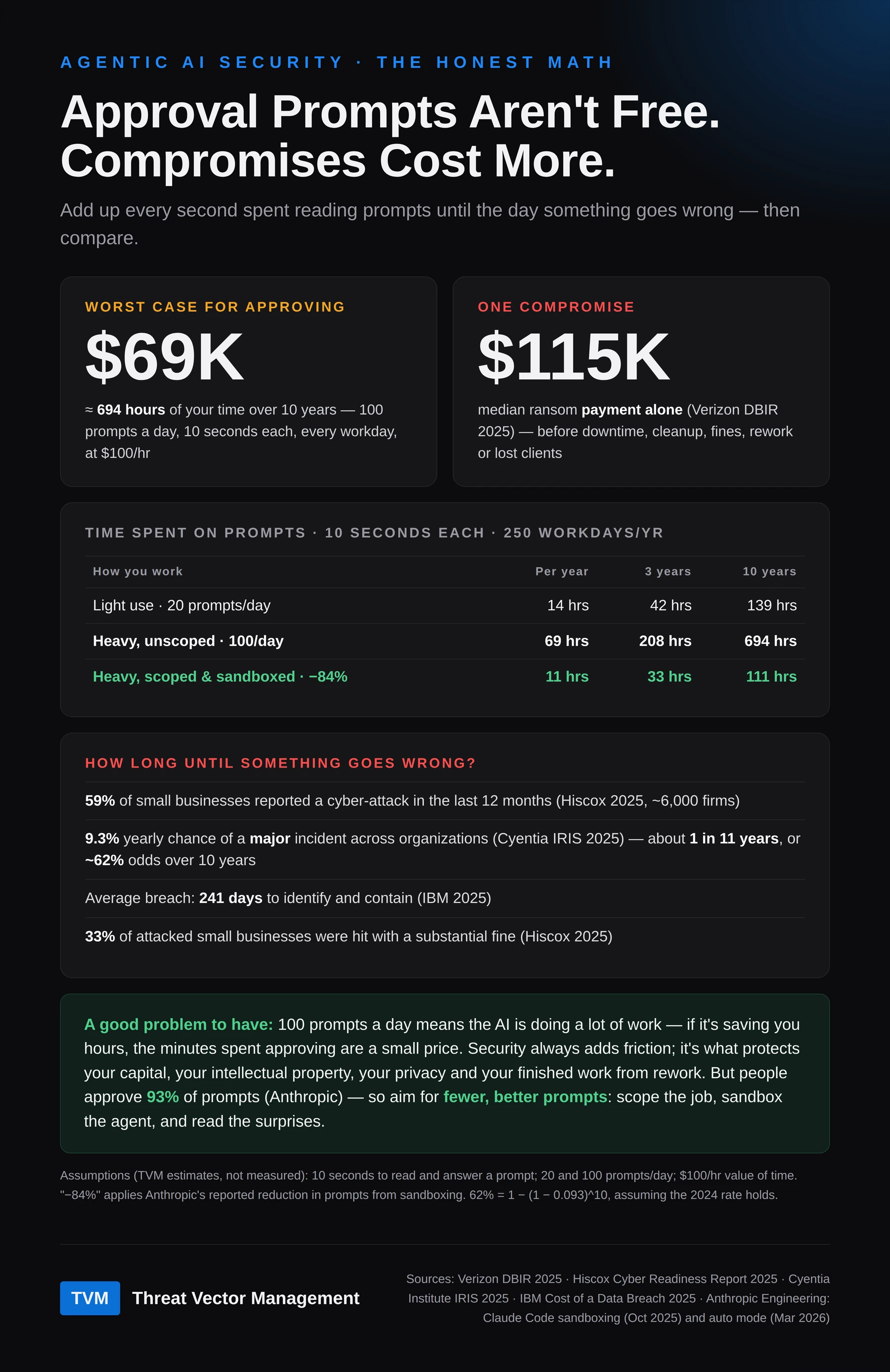
The number that should bother you most isn't either of those. Anthropic reports that people approve 97% of the permission prompts they see in Claude Code (August 2026; its March post put the figure at 93%), and that approval fatigue makes people stop paying attention. In a study of 1,053 paid testers cited by Anthropic, participants blocked just 13.6% of dangerous commands (Anthropic's automated reviewer blocked 89%). A prompt you don't read costs time and protects nothing.
And 100 prompts a day is a good problem to have. It means the AI is doing a lot of work for you — if it's saving you hours, the minutes spent approving are a small price. Security always adds friction. That friction is what protects your capital, your intellectual property, your privacy, and the work you've already finished from having to be redone.
So the answer isn't "Always Allow." It's fewer, better prompts. Anthropic found sandboxing cut permission prompts by 84% in its own internal use. Scope the job tightly, sandbox the agent, and the prompts that are left are the surprises worth reading — which is what the E in K.E.Y.S. is for.
Measure it: eight KRIs to start tracking
You can't manage approval fatigue by feel. Key risk indicators (KRIs) tell you whether your agents are under control or just busy. The first three come from our talk at the Polk County Security Summit. The other five turn the trifecta and the MFA advice in this post into numbers you can count.
| KRI | What to count | Target (ours) | Why it matters |
|---|---|---|---|
| 1. AI approval rate | Prompts approved ÷ prompts shown, per person and per agent | Trending down, with every denial logged | Claude Code users approve 97% of prompts (Anthropic, Aug 2026). Near 100%, a prompt is a habit, not a control. |
| 2. Time to approve | Seconds from prompt shown to answer | No faster than a read: about 6 seconds for a 25-word prompt | By the 20th time people saw the same standard warning, the median time to dismiss it was 1.2 seconds (Bravo-Lillo et al., 2014). Adults read non-fiction at about 238 words a minute (Brysbaert, 2019). |
| 3. Actions under a human's identity | Agent actions logged under a person's account or session instead of the agent's own | Zero | The borrowed-badge problem: when the agent wears your badge, the logs can't tell you apart. CISA's guidance gives each agent its own identity. |
| 4. Agents with all three trifecta legs | Agents that can reach sensitive data, read untrusted content and send data out | Zero | That combination is the exfiltration path (Willison, 2025). |
| 5. Standing or shared agent credentials | Agent logins that are long-lived API keys or shared service accounts | Zero; short-lived credentials only | CISA and its Five Eyes partners prefer short-lived credentials over persistent secrets (May 2026). |
| 6. Unvetted or unpinned plugins | MCP servers, skills and plugins not from the real publisher, or not pinned to a version | Zero | The fake postmark-mcp server and the malicious OpenClaw skills were both unvetted third-party add-ons that looked legitimate. |
| 7. Remembered devices on high-value accounts | Banking, primary email and password-manager sessions marked “trusted” | Zero | A stolen Remember-Me cookie signs in without a password or MFA (FBI, 2024). |
| 8. Text-message MFA on high-value accounts | Accounts that still accept SMS or voice-call codes | Zero | CISA: “Do not use SMS as a second factor for authentication.” |
How to read them together. A high approval rate plus approvals faster than a read means people are rubber-stamping. The fix is not more prompts. Scope the agent (the K in K.E.Y.S.) so the prompts that remain are rare enough to read.
Where to start. KRIs 7 and 8 are a few settings per account, so do them first. KRIs 3 to 6 need an inventory of your agents and what they connect to; that can follow within the quarter. KRIs 1 and 2 need logs from your agent tools, so add them as those tools allow.
The targets are our recommendations, not an industry standard. The sources behind each row are listed below.
Your last line of defense: MFA that lives somewhere else
Assume, for a moment, the agent is compromised. What stops the attacker from walking into your bank, your email or your social accounts?
Mostly this: MFA on a separate device, and a computer your accounts don't trust by default.
When you tick "Remember this device" or "Trust this browser," the site stores a long-lived cookie that says, in effect, this person already passed MFA. In late 2024 the FBI's Atlanta field office warned that criminals are increasingly stealing these Remember-Me cookies: "If a cybercriminal obtains the Remember-Me cookie from a user's recent login to their web email, they can use that cookie to sign-in as the user without needing their username, password, or multifactor authentication (MFA)."
Those cookies live in your browser profile on disk — exactly where infostealer malware looks, and within reach of any agent you've given broad file or command-line access to. The s1ngularity attack above was a file hunt run through the victim's own AI tools. Browser session data is an obvious next stop.
To be precise about the trade-off: skipping "remember this device" doesn't make you immune to session theft. Any logged-in session has a cookie. What it does is shrink the window from weeks to hours and force a fresh MFA check on the accounts that matter.
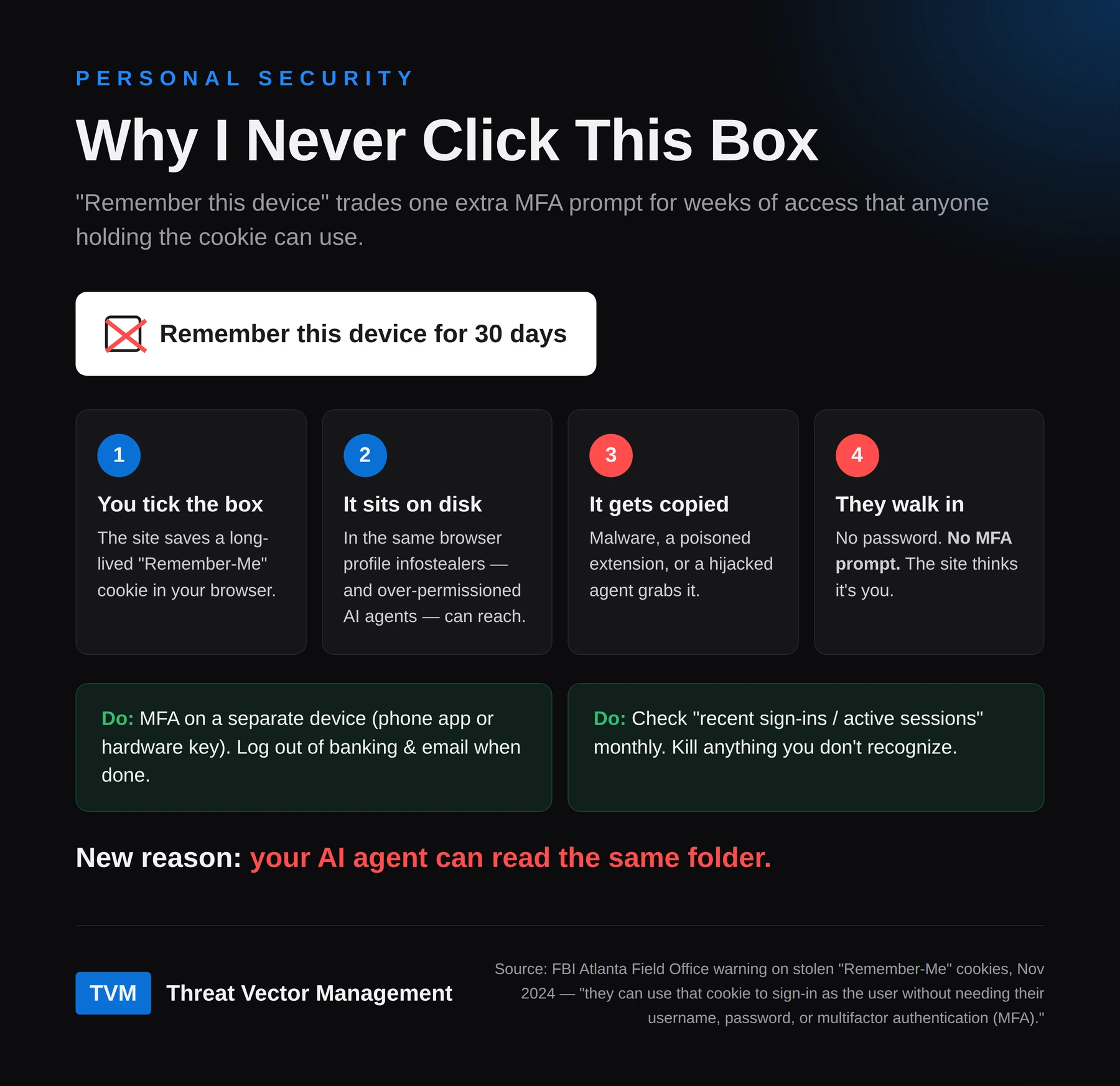
What to do: - Never mark your computer or browser as trusted for banking, primary email, password manager, cloud storage or social media. - Keep MFA on a separate device — an authenticator app on your phone or a hardware key — not on the same machine the agent runs on. - Log out of high-value accounts when you're done. It's the cheapest control on this list. - Once a month, check each important account's "recent sign-ins" or "active sessions" page and end anything you don't recognize.
Where your MFA should live
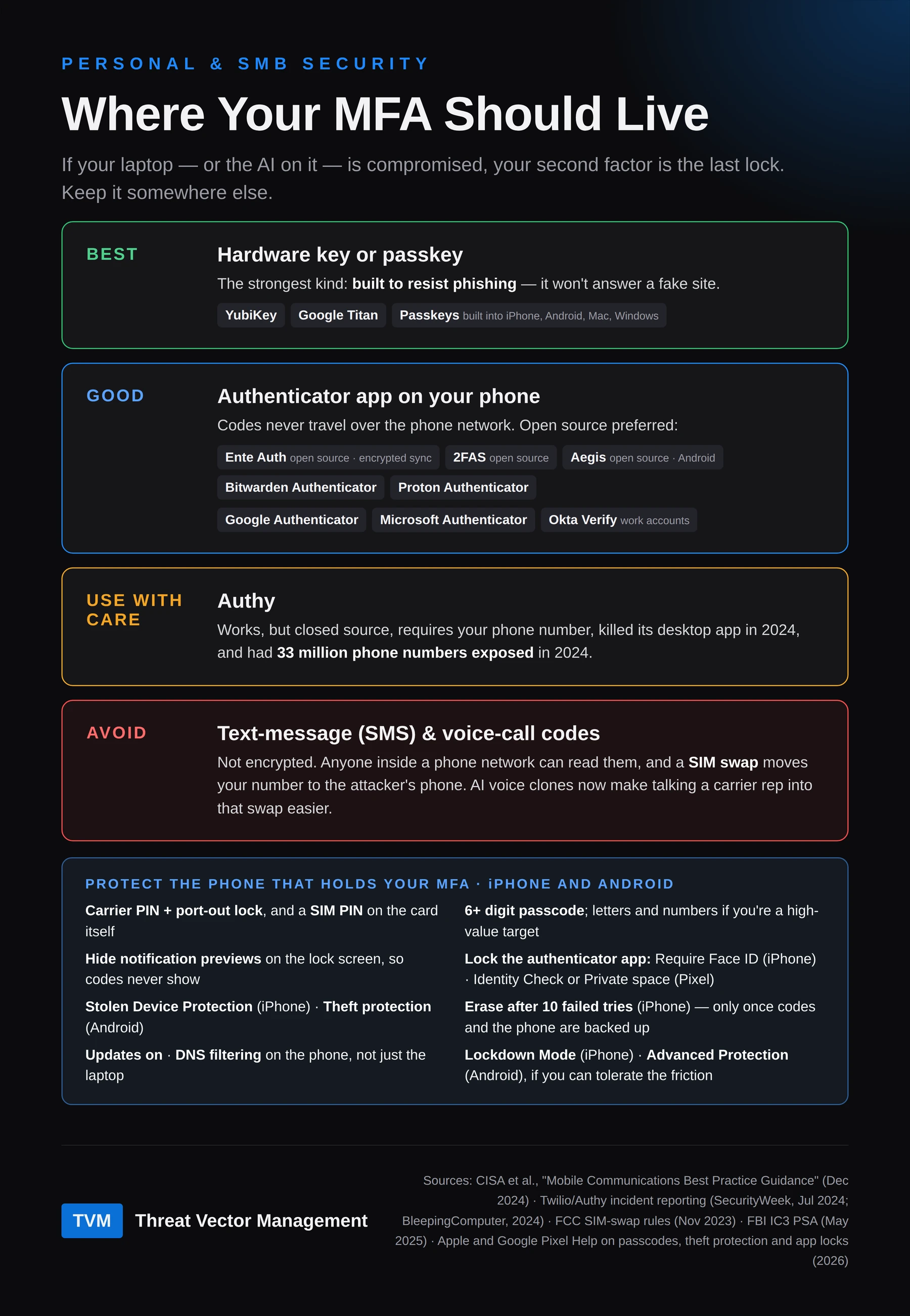
Not all second factors are equal. In order of strength:
- Best — a hardware key or passkey. YubiKey, Google Titan, or the passkeys built into your phone and computer. These are built to resist phishing: they won't answer a fake site. CISA calls hardware FIDO keys "the most effective."
- Good — an authenticator app on your phone. The codes never travel over the phone network. We prefer open source:
- Ente Auth — open source, end-to-end encrypted sync, works on phone and desktop
- 2FAS — open source, iPhone and Android
- Aegis — open source, Android only
- Bitwarden Authenticator and Proton Authenticator — open-source apps
- Mainstream options that are fine: Google Authenticator, Microsoft Authenticator, and Okta Verify for work accounts.
- Use with care — Authy. It works, but it's closed source, requires your phone number, shut down its desktop app in 2024, and had 33 million users' phone numbers exposed in 2024.
- Avoid — text-message (SMS) and voice-call codes. CISA's guidance is blunt: "Do not use SMS as a second factor for authentication. SMS messages are not encrypted." Anyone with access inside a phone carrier's network can read them, and phone networks have been breached. A SIM swap — talking a carrier into moving your number to the attacker's phone — hands over every code. The FCC tightened carrier rules against this in 2023, but it still happens, and AI voice cloning makes impersonating you to a carrier rep easier. The FBI has already warned about AI-cloned voices impersonating senior officials.
To be precise: MFA can have technical flaws. Oasis Security's "AuthQuake" research showed Microsoft's MFA could be brute-forced before Microsoft fixed it in October 2024. But that's rare. Nearly every "MFA bypass" goes around the second factor, not through it — which is why where it lives matters so much.
Protect the phone that holds your MFA. Keep it as hardened as you can tolerate. Updates stay on, filtering DNS goes on the phone as well as the laptop, and apps come only from the official store. Then:
| Setting | iPhone | Android (Pixel and stock Android) |
|---|---|---|
| Carrier PIN + port-out lock | In your carrier’s app or account | Same |
| SIM PIN, so a thief can’t move your SIM to another phone | Settings > Cellular > SIM PIN. Get the default PIN from your carrier first; a wrong guess can lock the SIM for good | Search Settings for “SIM lock”. Same warning about the default PIN |
| 6+ digit passcode; letters and numbers if you’re a high-value target | Settings > Face ID & Passcode > Change Passcode > Passcode Options | Settings > Security & privacy > Device unlock > Screen lock: PIN or password |
| Hide notification previews on the lock screen, so codes and reset links never show | Settings > Notifications > Show Previews > When Unlocked | Search Settings for “notifications on lock screen” and hide sensitive content |
| Lock the authenticator app itself | Long-press the app > Require Face ID (iOS 18 and later) | Turn on Identity Check (below), or put the app in Private space with its own lock: Settings > Security & privacy > Privacy > Private space |
| Theft protection | Settings > Face ID & Passcode > Stolen Device Protection | Settings > Google > All services > Theft protection: Theft Detection Lock, Offline Device Lock, Failed Authentication Lock, Identity Check |
| Erase after failed tries — only once your codes and phone are backed up | Settings > Face ID & Passcode > Erase Data (after 10 failed attempts) | Pixels don’t wipe themselves; Google’s settings lock the phone instead. Samsung phones on One UI 9 lock for good after 13 failed tries, and only a factory reset reopens them. |
| If you can live with the friction | Lockdown Mode | Advanced Protection (Android 16) |
Before you turn on Erase Data, make sure you can survive it. A wipe also erases your authenticator unless its codes are synced or exported, so set that up first. Keep your accounts’ recovery codes on paper, and keep a current phone backup. Otherwise a curious child or a prankster can lock you out of your own accounts.
App locks fall back to the phone passcode. They stop someone who picks up your unlocked phone, not someone who watched you type the passcode. That second case is what Stolen Device Protection and Identity Check are for: they demand Face ID or a fingerprint for sensitive changes away from home. Some menu names vary by phone maker and version; search Settings if a path doesn’t match. We’ll cover the full phone checklist in its own post soon.
Framework mapping: OWASP ASI09 Human-Agent Trust Exploitation; NIST CSF 2.0 PR.AA-03 (users, services and hardware are authenticated); NIST SP 800-63B (restrictions on SMS/phone-network authenticators).
The bottom line
The approval prompts are annoying on purpose. They cost real time, so make each one count: give agents the access a job needs, for as long as the job takes, and keep a human on anything that can't be undone. Then keep your MFA somewhere the agent can't reach.
Threat Vector Management advises small businesses and high-value individuals adopting AI — including what agents should and shouldn't be able to touch before you connect them. Start a conversation →
Threat Vector Management is not affiliated with any company operating under the name "ThreatVector."
Sources
- Simon Willison — The lethal trifecta for AI agents, Jun 16, 2025. The trifecta concept is his; the business and household adaptation is ours.
- CISA, NSA, ASD's ACSC, Canadian Centre for Cyber Security, NCSC-NZ, NCSC-UK — Careful Adoption of Agentic AI Services, May 1, 2026. Summaries: Crowell & Moring, Cloud Security Alliance
- OWASP GenAI Security Project — Top 10 for Agentic Applications, Dec 9, 2025
- Invariant Labs — GitHub MCP Exploited: Accessing private repositories via MCP, May 26, 2025
- EchoLeak, CVE-2025-32711 — Hack The Box technical analysis; arXiv paper
- Snyk — Weaponizing AI coding agents for malware in the Nx malicious package, Aug 2025; Wiz analysis
- The Hacker News — First malicious MCP server found stealing emails (postmark-mcp), Sep 2025; Postmark statement
- Kaspersky — New OpenClaw AI agent found unsafe for use, Feb 10, 2026
- Oasis Security — ClawJacked: OpenClaw vulnerability enables full agent takeover, Feb 26, 2026
- IBM — Cost of a Data Breach Report 2025
- Verizon — 2025 Data Breach Investigations Report; SMB findings via Infosecurity Magazine
- Hiscox — Cyber Readiness Report 2025; press release
- Cyentia Institute — IRIS 2025; 9.3% figure as summarized by Red Dog Security
- Anthropic Engineering — Claude Code sandboxing (Oct 2025, 84% fewer prompts) and Claude Code auto mode (Mar 2026, 93% of prompts approved)
- CISA et al. — Mobile Communications Best Practice Guidance, Dec 2024
- Oasis Security's AuthQuake research — The Hacker News, Dec 2024
- Authy incidents — SecurityWeek: 33M phone numbers; BleepingComputer: desktop app retired
- FCC — Protecting Consumers from SIM-Swap and Port-Out Fraud, 2023
- FBI IC3 — Senior US Officials Impersonated in Malicious Messaging Campaign, May 2025
- Cloudflare — TLS decryption requirements and prompt injection detection (example vendor documentation, not an endorsement)
- App comparison (vendor-authored, read with that in mind) — Ente: Ente Auth vs others
- FBI Atlanta field office warning on Remember-Me cookies, Nov 2024, as reported by Forbes and Malwarebytes
- Anthropic, as reported by DevOps.com — Anthropic Makes Claude Code’s Auto Mode the Default, Aug 10, 2026 (97% approval rate); also Help Net Security, Aug 10, 2026 (97%; testers blocked 13.6% of dangerous commands, auto mode 89%, 1,053 testers)
- Bravo-Lillo, Cranor et al. — Harder to Ignore? Revisiting Pop-Up Fatigue and Approaches to Prevent It, SOUPS 2014 (Table 1: median 1.2 s to dismiss the standard dialog at the 20th exposure)
- Brysbaert — How many words do we read per minute? A review and meta-analysis of reading rate, Journal of Memory and Language, 2019 (238 wpm, non-fiction)
- Apple — Use a passcode with your iPhone (six-digit default, custom alphanumeric, Erase Data after 10 failed attempts); iOS 18 per-app Face ID lock as described by iDrop News
- Apple — Use a SIM PIN for your iPhone or iPad; Samsung — Lock screen security changes in One UI 9
- Google — Pixel: Protect your personal data against theft; Hide sensitive apps with private space; Android theft protection feature updates, Jan 27, 2026